

Download BlockSite – Secure Website Blocking, Parental Control & Focus Tool
Overview
BlockSite is a versatile web‑browser companion designed to keep you, your family, or your workplace free from distracting, illegal, or inappropriate content. By letting you create custom blacklists, whitelists, and keyword filters, BlockSite turns any browser into a focused, safe environment. The app works seamlessly in normal and Incognito modes, offers password‑protected settings, and even notifies you via email if someone tries to uninstall it.
Whether you need a “Work Mode” to boost productivity, “Block Adult Sites” for child safety, or a timed lock to enforce study breaks, BlockSite delivers a clean, secure browsing experience across Windows, macOS, Android, and iOS devices. The built‑in sync feature lets you carry the same rules across multiple devices, ensuring consistent protection wherever you go. With a simple right‑click you can access a quick‑menu for immediate blocking or unblocking, making the tool both powerful and user‑friendly.
BlockSite is more than just a blocker; it’s a proactive guardian that redirects illegal attempts to safer alternatives, helping you stay compliant with local regulations while maintaining internet freedom for legitimate use.
Key Features & Capabilities
- Blacklisting & Whitelisting: Define explicit lists of prohibited and allowed websites, giving you granular control over every URL.
- Keyword Block: Prevent access to any site containing specific words or phrases, ideal for filtering search terms.
- Work Mode: Activate a distraction‑free environment that blocks social media, streaming platforms, and other time‑sinks during work hours.
- Parental Controls – Block Adult Sites: Automatically filter adult content, providing a safer browsing experience for children.
- Redirect Function: When a blocked site is accessed, users are automatically redirected to a predefined safe alternative.
- Password Protection & Uninstall Prevention: Secure settings with a password and receive email alerts if an uninstall attempt is made.
- Incognito Compatibility: Block rules remain effective even in private browsing sessions.
- Device Sync: Sync your block lists and preferences across Windows, macOS, Android, and iOS devices.
- Timed Locks: Set specific periods during which selected sites remain inaccessible, perfect for study sessions or family time.
- Quick Access Menu: Right‑click any page to instantly add it to the block or whitelist without leaving the browser.
Each feature is crafted to balance security with flexibility. For instance, the redirect function not only blocks illegal content but also educates users by guiding them to legitimate resources. The password protection layer ensures that only authorized users can modify the settings, making BlockSite an excellent choice for public computers, libraries, or shared family devices.
Moreover, the sync capability eliminates the hassle of configuring each device individually; once you set up your rules on one device, they propagate automatically to all others linked to your account. This level of consistency is especially valuable for businesses that need to enforce corporate browsing policies across multiple workstations. BlockSite’s UI is intentionally minimalistic—clear toggles, searchable lists, and colour‑coded status indicators make management intuitive, even for non‑technical users.
The combination of these features makes BlockSite a comprehensive solution for anyone seeking a secure, distraction‑free online experience.
Installation & Usage Guide
Step‑by‑Step Installation
- Visit the official BlockSite website or your platform’s app store (Microsoft Store, Mac App Store, Google Play, or Apple App Store).
- Click “Download” for Windows/macOS or “Install” for Android/iOS. The installer is signed and free of adware.
- Run the downloaded file (Windows:
.exe, macOS:.dmg) and follow the on‑screen prompts. On mobile, tap “Accept” to grant the required permissions (access to browser settings, notification access, and device admin for uninstall protection). - After installation, launch BlockSite. The first‑time wizard will ask you to create a master password—this is mandatory for changing any block settings.
- Sign in with your email to enable sync across devices. A verification link will be sent to confirm ownership.
Basic Configuration
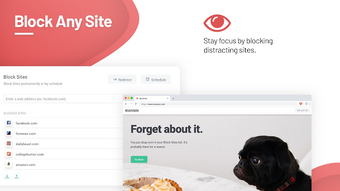
Once the app is running, you’ll see the main dashboard with three tabs: Blacklist, Whitelist, and Keywords. To block a website, simply click “Add URL” under the Blacklist tab, paste the address, and press “Save”. For instant blocking, open any website, right‑click, and select “Block with BlockSite”. The same process works for whitelisting trusted sites. To set up a keyword filter, type the unwanted term under the Keywords tab; any page containing that term will be intercepted and redirected.
Activating Work Mode & Timed Locks
Work Mode can be toggled from the top‑right corner of the dashboard. When enabled, you can choose preset schedules (e.g., 9 am–5 pm) or define custom hours. During Work Mode, all sites not explicitly whitelisted are blocked, and notifications are muted to keep focus intact. For timed locks, select a site or keyword, choose “Lock for…”, and specify the duration (e.g., 30 minutes, 2 hours). After the timer expires, the block is automatically lifted.
Managing Parental Controls
Parents can enable “Block Adult Sites” with a single toggle. The system uses an extensive database of adult domains and continuously updates it via the cloud. Additionally, you can add custom categories (e.g., “Violence”, “Gambling”) and assign them to child profiles. The app sends weekly email summaries showing blocked attempts, giving you insight into your child’s browsing habits without invading privacy.
Troubleshooting Common Issues
If BlockSite does not appear in Incognito mode, ensure the “Enable in Private Browsing” option is turned on in the settings. For uninstall‑prevention alerts, verify that your email address is correctly entered under “Account Settings”. Should you encounter sync problems, log out and back in, or refresh the sync manually from the “Sync” tab. The support team offers a 24‑hour response window via in‑app chat.
Compatibility, Pros & Cons
BlockSite is built to run natively on the major operating systems: Windows 10/11, macOS 10.15+ (Catalina and later), Android 8.0+ and iOS 13+. Browser extensions are also available for Chrome, Edge, and Firefox, extending protection to users who prefer not to install a standalone app. The app’s lightweight design ensures minimal impact on system resources, using less than 30 MB of RAM on average.
Pros
- Comprehensive Blocking: Combines URL, keyword, and category filters in one interface.
- Cross‑Platform Sync: Seamlessly propagates rules across Windows, macOS, Android, and iOS.
- Parental Controls: Built‑in adult‑site filter with customizable child profiles.
- Password & Uninstall Protection: Prevents unauthorized changes and alerts you to tampering.
- Work Mode & Timed Locks: Boosts productivity with scheduled blocking.
- Free Core Version: Core features are available at no cost, with optional premium upgrades.
Cons
- Premium Features Locked: Advanced analytics and multi‑user management require a subscription.
- Initial Setup Complexity: New users may need time to configure lists and passwords.
- Browser Extension Limitations: Some advanced features (e.g., uninstall protection) are unavailable in extension‑only mode.
- Dependency on Internet: Sync and remote updates need a stable connection; offline mode works but lacks real‑time updates.
Overall Rating: 4.5 / 5
BlockSite stands out as a robust, multi‑platform solution for anyone needing to enforce safe browsing habits. Its blend of security, productivity tools, and parental controls makes it a top choice for families and small businesses alike. While the premium tier adds valuable analytics, the free version already delivers impressive functionality.
Frequently Asked Questions
Can BlockSite block apps, not just websites?
The core application focuses on web content. However, on Android and iOS you can enable “App Blocking” within the settings, which uses the same blacklist logic to restrict specific apps.
Is my data safe when syncing across devices?
Yes. All sync data is encrypted with TLS 1.3 and stored on secure servers. BlockSite never logs browsing history, only the block lists you create.
Can I export my block lists for backup?
Absolutely. In the Settings menu, choose “Export Lists” to download a JSON file that can be imported later or shared with another device.
Does BlockSite work with VPNs or proxy servers?
BlockSite monitors DNS requests at the OS level, so it functions even when a VPN or proxy is active. However, some VPNs that route all traffic through a custom DNS may bypass simple URL filters; in those cases enable the “Deep Packet Inspection” option (premium).
What happens if I forget my master password?
You can reset the password via the “Forgot Password” link, which sends a secure reset token to your registered email. After verification, you can set a new master password.
Is there a free version, or do I need to pay?
BlockSite offers a fully functional free tier that includes blacklisting, keyword blocking, work mode, and basic parental controls. Premium features such as advanced analytics, multi‑user management, and deep packet inspection are available via a subscription.
Conclusion & Call to Action
In a world where distractions are a click away and unsafe content can slip through unnoticed, BlockSite provides a reliable, cross‑platform shield that adapts to personal, educational, and professional environments. Its blend of URL, keyword, and category filters, together with powerful parental controls and a secure password‑protected settings hub, makes it a standout choice for anyone serious about safe browsing and productivity. Installation is straightforward, sync keeps your rules consistent, and the free version already covers the essentials. For power users, the premium upgrade unlocks deeper analytics and enterprise‑grade management.
Ready to reclaim your focus and protect your family? Download BlockSite now and start building a healthier online routine today.